| まず、デフォルトではIPv6 で通信できないので、インストールする必要がある。といっても、DOSプロンプトで以下のコマンドを叩くだけ。
F:\Documents and Settings\mtvictory>ipv6 install
Installing...
Succeeded.
|
と、素っ気無いが、しかも、”LAN接続プロパティ”にも直接、設定内容が表示されない。
ちなみに、”ネットワーク接続”の”LAN接続プロパティ”のダイアログが開いたままだと、以下のエラーとなる。
F:\Documents and Settings\mtvictory>ipv6 install
The write lock could not be acquired.
You must close ls first.
|
で、本当にインストールされたのかを確認。これもコマンドで。
F:\Documents and Settings\mtvictory>ipv6 if
Interface 4: Ethernet: ローカル エリア接続
  uses Neighbor Discovery
  uses Router Discovery
  link-layer address: 00-04-76-cf-e0-bc
    preferred link-local fe80::204:76ff:fecf:e0bc, life infinite
    multicast interface-local ff01::1, 1 refs, not reportable
    multicast link-local ff02::1, 1 refs, not reportable
    multicast link-local ff02::1:ffcf:e0bc, 1 refs, last reporter
  link MTU 1500 (true link MTU 1500)
  current hop limit 128
  reachable time 27000ms (base 30000ms)
  retransmission interval 1000ms
  DAD transmits 1
Interface 3: 6to4 Tunneling Pseudo-Interface
  does not use Neighbor Discovery
  does not use Router Discovery
  link MTU 1280 (true link MTU 65515)
  current hop limit 128
  reachable time 42000ms (base 30000ms)
  retransmission interval 1000ms
  DAD transmits 0
Interface 2: Automatic Tunneling Pseudo-Interface
  does not use Neighbor Discovery
  does not use Router Discovery
  router link-layer address: 0.0.0.0
  EUI-64 embedded IPv4 address: 0.0.0.0
    preferred link-local fe80::5efe:192.168.0.3, life infinite
  link MTU 1280 (true link MTU 65515)
  current hop limit 128
  reachable time 41000ms (base 30000ms)
  retransmission interval 1000ms
  DAD transmits 0
Interface 1: Loopback Pseudo-Interface
  does not use Neighbor Discovery
  does not use Router Discovery
  link-layer address:
    preferred link-local ::1, life infinite
    preferred link-local fe80::1, life infinite
  link MTU 1500 (true link MTU 4294967295)
  current hop limit 128
  reachable time 21000ms (base 30000ms)
  retransmission interval 1000ms
  DAD transmits 0
|
どうやら使えるようにはなったらしい。4つもインターフェースがある!が、それぞれにそれなりの意味がある。
「link-layer address」とはMAC アドレスのことらしい。で、「link-local」と書かれた部分がIPv6 アドレス。
「Interface 4: 」のアドレスを見ると、"link-local"アドレスにMAC アドレスが埋め込まれているのが分かる。
link-layer address: 00-04-76-cf-e0-bc (MAC アドレス)
preferred link-local fe80::204:76ff:fecf:e0bc
そこで、IPv6 対応のPing コマンドを自分宛に投げてみる(Interface 1 宛ループバック)。
F:\Documents and Settings\mtvictory>ping6 ::1

Pinging ::1
from ::1 with 32 bytes of data:

Reply from ::1: bytes=32 time<1ms
Reply from ::1: bytes=32 time<1ms
Reply from ::1: bytes=32 time<1ms
Reply from ::1: bytes=32 time<1ms

Ping statistics for ::1:
    Packets: Sent = 4, Received = 4, Lost = 0 (0% loss),
Approximate round trip times in milli-seconds:
    Minimum = 0ms, Maximum = 0ms, Average = 0ms
|
もういっちょ、Interface 2 宛ループバックでは、同様に
F:\Documents and Settings\mtvictory>ping6 fe80::5efe:192.168.0.3%2
|
とやって、正常に応答があった。「192.168.0.3」は通常使用するIP アドレス(IPv4)。また「%2」というのはInterface 番号。更にもういっちょ、Interface 4 宛ループバックでは?
F:\Documents and Settings\mtvictory>ping6 fe80::204:76ff:fecf:e0bc%4
|
これも正常に応答があった。
1台のPCでは面白くないので、もう1台XPマシンを用意して、IPv6 をインストール(IPv4 アドレスは192.168.0.4、Interface 2 )。2台のPCは10/100Base-T の Shared HUB で接続されている。そいつにPing6 コマンドを投げてみる。
F:\Documents and Settings\mtvictory>ping6 fe80::5efe:192.168.0.4%2
|
これも正常に応答があった。Interface 4 では、
F:\Documents and Settings\mtvictory>ping6 fe80::206:5bff:feb8:ddd3%4
|
これも正常に応答があった。やった、通信できたぞ。
いや、待て。喜ぶのはまだ早い。本当にIPv6 で喋っているかどうかはパケットを見るまでは安心できない。
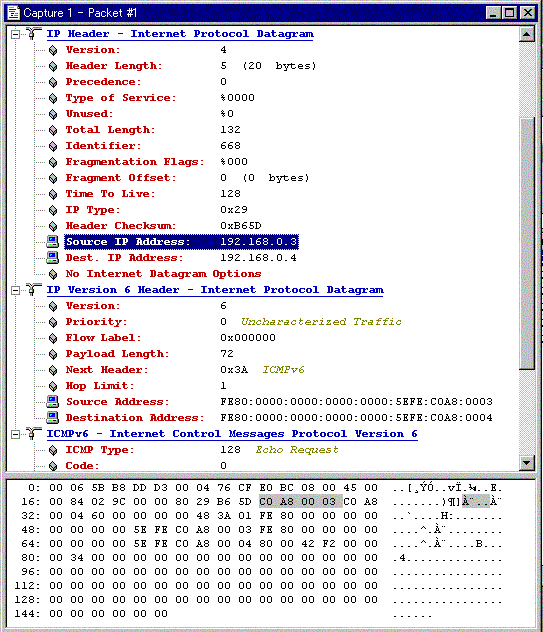
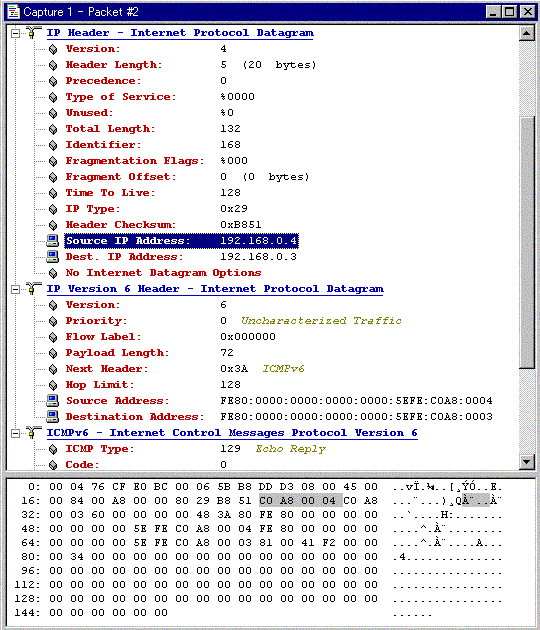
「EtherPeek」(WildPackets, Inc. )というネットワークモニターツール(IPv6 対応)を使って、ping6 実行時のパケットをキャプチャしてみる。
1) ICPM Echo Request パケットのデコード画面
2) ICPM Echo Reply パケットのデコード画面
確かに、IPv6 で通信していることが分かる。
さて、ping6 の他にも接続診断用のコマンドがあるのでこれも試してみた。”ipv6 nc”とやると、近隣ノード キャッシュ情報が得られる。IPv4 でいうところの、ARP コマンド。
F:\Documents and Settings\mtvictory>ipv6 nc
4: fe80::206:5bff:feb8:ddd3 00-06-5b-b8-dd-d3 stale
4: fe80::204:76ff:fecf:e0bc 00-04-76-cf-e0-bc permanent  ←自ホスト
2: fe80::5efe:192.168.0.4 192.168.0.4       permanent
2: fe80::5efe:192.168.0.3 127.0.0.1         permanent   ←自ホスト
1:                ::1                   permanent
1:            fe80::1                   permanent
|
”tracert6”ってものある(パス追跡)。
F:\Documents and Settings\mtvictory>tracert6 fe80::5efe:192.168.0.4%2

Tracing route to fe80::5efe:192.168.0.4%2
from fe80::5efe:192.168.0.3%2 over a maximum of 30 hops:

  1       <1 ms    <1 ms    <1 ms  fe80::5efe:192.168.0.4%2

Trace complete.
|
|